Game of Life in Javascript

What are we talking about?
I coded up a fairly well known mathematical "cellular automata" in Javascript, HTML, and CSS. Here's a link to the running site:
This post is about the creation of that page along with some code snippets and my thoughts. The code is all public on GitHub, here's a link to the repository:
Description of the "Game"
Conway's Game of Life is a mathmatical grid-based "game" in which cells on the grid can exist in two states: alive or dead. After an initial input (settin some cells as alive), the game proceeds to the next state by applying rules on a cell-by-cell basis. For example, one rule states that:
- Any live cell with two or three live neighbours lives on to the next generation.
EXAMPLE - Cell Living On:
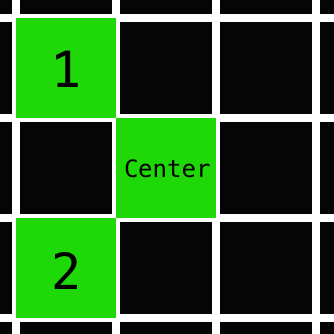
The live center cell, with two living neighbors, will be alive next round
While another rule states:
- Any live cell with more than three live neighbours dies, as if by overcrowding.
EXAMPLE - Doomed Cell:
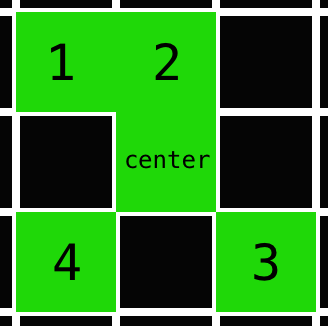
The same live center cell, now with four neighbors, will be dead next round due to 'overcrowding'
By combining these with a few other rules, the next state of any cell is determined by the current state of its 8 surrounding neighbors. It's really more of a mathmateical progression from a predefined starting arrangement of cells than a true "game".
Why make this?
I chose to start this project a few months ago. At that time, producing a simple game in javascript seemed like a great way to get more experience coding in JavaScript and doing a lot of DOM manipulation with JQuery. Soon after starting, I ended shelving the project for a few months to do some freelance web dev work. I read some books on JavaScript, most notably the oft-recommended Javascript the Good Parts along with Javascript Enlightment.
Feeling more confident in my JavaScript knowledge and looking for somewhere to appy it, I decided to revive Game of Live - Javascript (GoLJS) and attempt to complete it.
Mostly Pure HTML/CSS/JS, with a sprinkling of...
- JQuery - The ubiquitous and versatile JavaScript library. I'd included this when originally starting the project, but ended up only using it for basic DOM binding and manipulation. I may take it out and use vanilla JavaScript later on as an exercise.
- normalize.css - "A modern, HTML5-ready alternative to CSS resets", I included this to minimize cross-browser styling headaches and focus on the actual GoL implementation.
This is a small project, so I opted to use pure css rather than my go-to Sass/SCSS preprocessor (which I definitely missed as the number of elements to style grew).
Code organization
Here's the current file structure:
    GoLJS
    ├── css
    │   └── main.css
    ├── index.html
    ├── js
    │   ├── automater.js
    │   ├── bindings.js
    │   ├── controller.js
    │   ├── game_board.js
    │   └── view.js
    ├── README.md
    └── todo.txt

    2 directories, 9 files
Directory list created by tree, a recursive directory display for linux
Pretty straightforward. I tried to keep the JavaScript modular, with each file containing functions to handle its specific domain:
- automater.js handles the time-step advance of the board state (more about this further below)
- bindings.js contains all of the event (e.g. on click) bindings
- controller.js simply calls to initialize the board/bindings and sets up the demo cell pattern on page load
- game_board.js stores a board object, with all sorts of functions to deal with current and future cell states
- view.js is responsible for rereshing visual elements on the page following a board state-change
Automating board updates with setTimeout()
One necessary feature was to provide a way to automatically advance the game state at set time intervals, also allowing the user to pause/resume at any point.
I'd played around making games in C# using Microsoft's XNA Game Studio a few years back, and had always used pauses/sleeps within methods to delay execution when in a game loop. In JavaScript, my initial attempt looked something like this:
automate.loop = function(refresh_interval){
  while(automate.active){
  //update the game state, refresh the display
  board.nextState();
  view.refresh(board);

  //now wait the interval before looping again
  sleep(refresh_interval);
  //note: sleep() function doesn't actually exist...
  }
}
This approach doesn't work out in JavaScript. In C#, your code can run across multiple threads, allowing a function to go to 'sleep' or pause it's own thread without interrupting the operation of code in other threads.
With Javascript, however, is a single-thread model based on triggering asynchronous events. If the current function goes to sleep, it hogs the sole thread and your program becomes completely unresponsive for the duration. Because of this, JavaScript doesn't even have a pure built-in sleep function. Instead, it has setTimeout(), and the similar setInterval().
setTimeout takes two arguments, a callback function, and a delay in milliseconds afterwhich to trigger that callback.
To make the above game loop work using setTimeout(), you need to split up the code across two functions: one function to set up the timeout, and a callback function to execute once the timeout triggers. In order to have a more responsive pause, I also added a flag on the callback to cancel the execution if automate had been paused. Here are the two functions:
automate.loop = function(){
  setTimeout(this.advance, this.timestep);
};

automate.advance = function(){
  if (automate.active){
    board.nextState();
    view.refresh(board);
    automate.loop();
  }
};
No longer using a while loop, instead the callback calls the original timeout-setting function.
Other code of interest
Checking on the neighbors
The code that handled determining the next state of a cell based on its neighbors (per the game rules) was the greatest source of bugs/complications. Here's a snippet from that function in game_board.js, within the board.nextCellState function:
board.nextCellState = function (cell_loc){
  //return next state of passed-in cell
  var row = cell_loc[0];
  var col = cell_loc[1];
  var neighbors = [0,0,0,0,0,0,0,0]; //top, right, bottom, left, t-r, b-r, b-l, t-l
 //...
 //top-right neighbor check
  if(this.getState([(row + 1), (col + 1)]) === 1){
    neighbors[4] = 1;
  }
  //bottom-right neighbor check
  if(this.getState([(row - 1), (col + 1)]) === 1){
    neighbors[5] = 1;
  }
 //...
A neighbors array was used to store the results of all the explicit checks, updating the value to 1 if that neighbor was a live cell. It felt a bit clunky to write out all 8 neighbor cell checks, but I couldn't think of a more elegant solution.
Boundary conditions
One final challenge was handling the boundaries of the grid. Initially, the idea was to make the bounding edges act as 'lava', killing all cells that came in contact with it. However, it turned out easier than expected (and more interesting) to link up the top-most row with the bottom, and left to right. For example, a cell structure making its way across the grid from left to right, woudl find itself 'teleported' back to the left edge upon reaching the right-most border.
A few simple checks in the board.getState function were all that was needed. If a cell's neighbor check pushed it beyond the grid boundary, e.g. a top cell checking its top neighbors, the board.getState function would instead loop around and check neighbors in those columns on the bottom-most row.
board.getState = function (cell_loc){
  var row = cell_loc[0];
  var col = cell_loc[1];

  //special boundary cases
  if(row === -1) { row = (this.height - 1);} //off the grid top, wrap to bot
  if(row === this.height) { row = 0 ;} //off the grid bot, wrap to top
  if(col === -1) { col = (this.width - 1);} //off the grid left, wrap to right
  if(col === this.width) { col = 0 ;} //off the grid right, wrap to left

  return this.state[(row * this.width + col)];
};
Closing thought
This turned out to be quite a long post, but I touched on most of the points of interest. The styling (css) took up some time, but was fairly straightforward so there's not much to discuss there. There's certainly more that could be polished/refactored or extra features that could be tacked on, but for now I'm quite happy with where GoLJS has ended up.